
What is L2TP/IPsec? It is a VPN setup that combines Layer Two Tunneling Protocol (L2TP) with Internet Protocol Security (IPsec). L2TP carries the connection inside a tunnel; IPsec adds encryption and authentication to protect that tunnel.
On a supported device, you can configure the connection through its VPN settings using details supplied by your provider. Understanding the two parts helps explain the settings you enter and what the connection can protect.
L2TP/IPsec at a glance
- L2TP: provides the tunneling layer; it does not encrypt traffic by itself.
- IPsec: provides security for the traffic carried between VPN endpoints.
- Your setup: must match the provider’s protocol, authentication details and supported device configuration.
What is L2TP?
L2TP stands for Layer Two Tunneling Protocol. It carries Point-to-Point Protocol (PPP) sessions across another network. In everyday VPN use, think of it as the system that packages a logical connection between your device and the VPN server.
The important distinction is that tunneling is not encryption. Moving data through an L2TP tunnel alone does not make its contents confidential. The protocol is defined in RFC 2661.
What is IPsec?
IPsec is a suite of mechanisms for protecting IP communications. Depending on the configuration, it can encrypt data, check whether packets were altered and help reject replayed packets. Authentication helps establish who is taking part in the protected connection.
For L2TP/IPsec, IPsec supplies the protection around the tunneled traffic. Its security architecture is described in RFC 4301. The actual algorithms and authentication settings still matter; the protocol name alone does not establish a service’s security level.
What is L2TP/IPsec, and how do the layers work?
A simplified outgoing path is: your traffic → the L2TP tunnel → IPsec protection → the VPN server. The server processes the protected traffic and forwards it according to its configuration. The two layers have different jobs, rather than providing two separate rounds of encryption.
The combination is specified in RFC 3193: Securing L2TP using IPsec. Device menus may call it L2TP/IPsec, L2TP over IPSec or L2TP/IPsec with a pre-shared key.
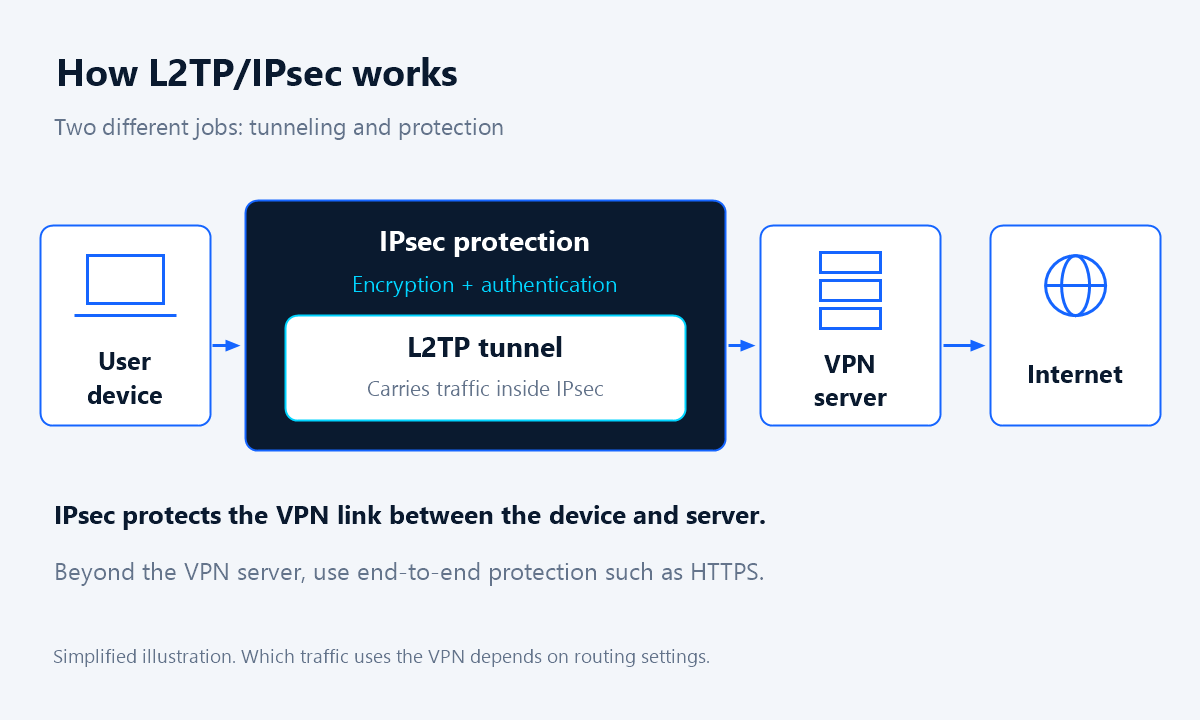
What happens when you connect?
1. Your device negotiates protection
It contacts the configured server and uses Internet Key Exchange (IKE) to negotiate IPsec protection. In a shared-secret setup, the pre-shared key participates in authentication; it is not the same thing as the negotiated keys used to protect session traffic. See the IKE specification.
2. The VPN session authenticates your account
The L2TP/PPP session is established and your account is authenticated. A correct shared secret does not replace a valid username and password.
3. Your device applies routes
The saved profile and server settings determine which traffic uses the VPN. Do not assume every application, DNS request or network route is covered just because the connection says Connected.
4. You check the result
Check the connection status, then test the traffic you intended to route. A changed public IP address can help confirm browser routing, but it is not a complete privacy or leak test. Review the device-specific instructions in the L2TPX setup guide.
What information do you need to configure it?
For the shared-secret setup described in L2TPX’s guides, keep these four details ready. Copy the issued values carefully; a connection name such as L2TPX VPN is just a label.
Server address
The hostname or IP address of the VPN server. Use the current connection address supplied for your service, rather than guessing it from a country name.
Username
The VPN account identifier issued by the provider. It is not necessarily the same as your website login or email address.
Password
The password for that VPN account. Do not substitute your device login password or assume that your website password is also the VPN password.
IPsec pre-shared key or shared secret
A separate value used for IPsec authentication. Enter it in the shared-secret or PSK field, not the account password field. Other deployments can use certificates; follow your provider’s instructions. Apple’s VPN security documentation distinguishes user authentication from machine authentication.
Advantages of this approach
- Manual setup: a compatible built-in client can connect without a separate provider application.
- Saved profiles: you can name a connection and reuse its settings.
- Familiar administration: it can fit an existing environment already configured for this protocol.
These benefits depend on the device and service. Microsoft documents both built-in clients and app-based VPN options in its Windows VPN connection types overview.
Limitations to understand before choosing it
- Compatibility varies: a VPN menu does not necessarily include L2TP/IPsec.
- More settings to enter: an incorrect server address, account detail or shared secret can prevent connection.
- Extra packet overhead: tunneling and IPsec add data to packets; performance depends on the device, server and network.
- Network restrictions: a firewall or restrictive network may interfere with the required traffic.
- No automatic feature guarantees: this protocol name does not promise a kill switch, reconnection behavior or full-device routing.
It is also a legacy option. Microsoft discourages L2TP for new RRAS deployments; new Windows Server 2025 RRAS setups do not accept it by default. That server-side change does not remove Windows client support, and it does not establish which server software L2TPX uses.
Device and OS compatibility considerations
Microsoft lists L2TP with pre-shared-key configuration in the built-in Windows VPN client. Apple documents L2TP/IPsec authentication for iOS, iPadOS and macOS. Check your installed release, available connection types and any device-management restrictions before buying or configuring a service.
Android devices, Linux clients and routers need their own checks. A router advertising VPN support might support a different protocol or offer a VPN server rather than the compatible client you need. Ask support to confirm the exact model and firmware.
Compatibility references checked on 29 October 2026: Microsoft Windows VPN documentation and Apple Platform Security. These describe platform capabilities, not universal compatibility with every provider.
L2TP/IPsec versus VPN apps
L2TP/IPsec is a protocol combination; a VPN app is software used to configure and manage a connection. An app may use a different protocol or manage a supported protocol for you. The presence of an app does not, by itself, tell you how traffic is protected.
With a built-in client, you enter the profile details yourself and use the operating system’s controls. A provider app may offer additional controls, but check its documented features. Manual setup does not automatically reproduce everything an app offers. Microsoft explains the profile workflow in Connect to a VPN in Windows.
When is L2TP/IPsec useful, and where does L2TPX fit?
It can be practical when you have a compatible built-in client and prefer a manually configured connection, or when an existing network already requires L2TP/IPsec. Router-based use is another possibility only after the router’s client and configuration are confirmed compatible.
L2TPX provides L2TP/IPsec access with device setup guides. To decide whether it fits your needs, check your device first, review the current VPN server locations and compare the available plans. Use the connection details issued for your service rather than example values from an article.
Security considerations and common setup problems
Protect the shared secret and account credentials. Do not post them in screenshots or support forums. A shared secret is sensitive authentication material, even though it is separate from your password. Microsoft’s pre-shared key guidance notes the authentication trade-off compared with certificates.
VPN protection covers the configured path between endpoints; it is not a guarantee of anonymity or protection from malicious websites. Keep using HTTPS, update your device and review the provider’s policies. No logging policy can be inferred from L2TP/IPsec itself.
If connection fails, verify the selected VPN type and all four issued details, then check your service status and network restrictions. If it connects but traffic behaves unexpectedly, review routing with the relevant setup guide. Do not disable security features or change advanced settings at random.
Frequently asked questions
Does L2TP encrypt my traffic by itself?
No. L2TP handles tunneling. In an L2TP/IPsec connection, IPsec provides the protection for the tunneled traffic.
Is the shared secret the same as my VPN password?
No. The shared secret is used for IPsec authentication; the password belongs to your VPN account. Enter each in its designated field.
Do I need to install a separate VPN app?
Not when your device has a compatible built-in client and your provider supports that configuration. Check the exact operating system and service instructions first.
Will all my traffic automatically use the VPN?
Not necessarily. Routing depends on the profile and server configuration. Check the guide for your device and verify the traffic you want to send through the connection.
Does a VPN make me anonymous?
No VPN protocol alone guarantees anonymity. Accounts you sign in to and the services you use can still identify you. Review the provider’s policies and keep using HTTPS.
Related setup guides
Ready to configure a supported device? Use the guide that matches your system:
Choose a plan for your supported device
Once you have checked compatibility and available locations, choose the access duration that suits you. Then follow the matching setup guide using your issued connection details.